在使用PyCharm开发PyQt6程序的时候,有时候调试会遇上一些比较诡异的问题。比如在macOS上,会出现以下报错:
objc[69622]: Class QDarwinBluetoothPermissionHandler is implemented in both /Users/jeza/PyqtInspect/.venv-313/lib/python3.13/site-packages/PySide6/QtCore.abi3.so (0x1070333f8) and /Users/jeza/PyqtInspect/.venv-313/lib/python3.13/site-packages/PyQt6/QtCore.abi3.so (0x106ac6f08). One of the two will be used. Which one is undefined.
objc[69622]: Class QDarwinCalendarPermissionHandler is implemented in both /Users/jeza/PyqtInspect/.venv-313/lib/python3.13/site-packages/PySide6/QtCore.abi3.so (0x107033470) and /Users/jeza/PyqtInspect/.venv-313/lib/python3.13/site-packages/PyQt6/QtCore.abi3.so (0x106ac6f80). One of the two will be used. Which one is undefined.
objc[69622]: Class QDarwinCameraPermissionHandler is implemented in both /Users/jeza/PyqtInspect/.venv-313/lib/python3.13/site-packages/PySide6/QtCore.abi3.so (0x1070334c0) and /Users/jeza/PyqtInspect/.venv-313/lib/python3.13/site-packages/PyQt6/QtCore.abi3.so (0x106ac6fd0). One of the two will be used. Which one is undefined.
objc[69622]: Class QDarwinContactsPermissionHandler is implemented in both /Users/jeza/PyqtInspect/.venv-313/lib/python3.13/site-packages/PySide6/QtCore.abi3.so (0x107033510) and /Users/jeza/PyqtInspect/.venv-313/lib/python3.13/site-packages/PyQt6/QtCore.abi3.so (0x106ac7020). One of the two will be used. Which one is undefined.
objc[69622]: Class QDarwinMicrophonePermissionHandler is implemented in both /Users/jeza/PyqtInspect/.venv-313/lib/python3.13/site-packages/PySide6/QtCore.abi3.so (0x107033560) and /Users/jeza/PyqtInspect/.venv-313/lib/python3.13/site-packages/PyQt6/QtCore.abi3.so (0x106ac70c0). One of the two will be used. Which one is undefined.
qt.qpa.plugin: Could not load the Qt platform plugin "cocoa" in "" even though it was found.
This application failed to start because no Qt platform plugin could be initialized. Reinstalling the application may fix this problem.

Available platform plugins are: offscreen, minimal, cocoa.
同样地,在Windows上可能也会出现类似的问题:
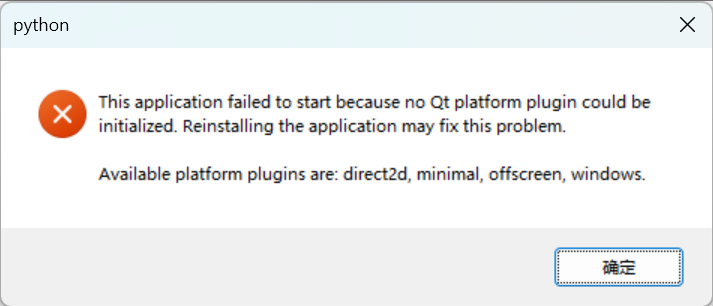
Windows上类似的错误
看起来是缺少插件或者环境问题导致的。但是诡异的是,直接运行却不会出现上述的问题,只有PyCharm上调试才会出现。那这种大概率是PyCharm内部机制影响到运行环境了。
修复方法
如果出现上述问题,可以先使用pip freeze观察下Python环境是否同时安装了PySide6和PyQt6,如果有,那大概率是PyCharm里面的pydevd调试器的补丁代码影响到程序运行了。
打开PyCharm的设置,在Python -> Debugger面板中,如果PyQt compatible已勾选,且所选项为Auto,此时需要调整为程序所用的框架,即PyQt6。保存设置后,重新调试就好啦。
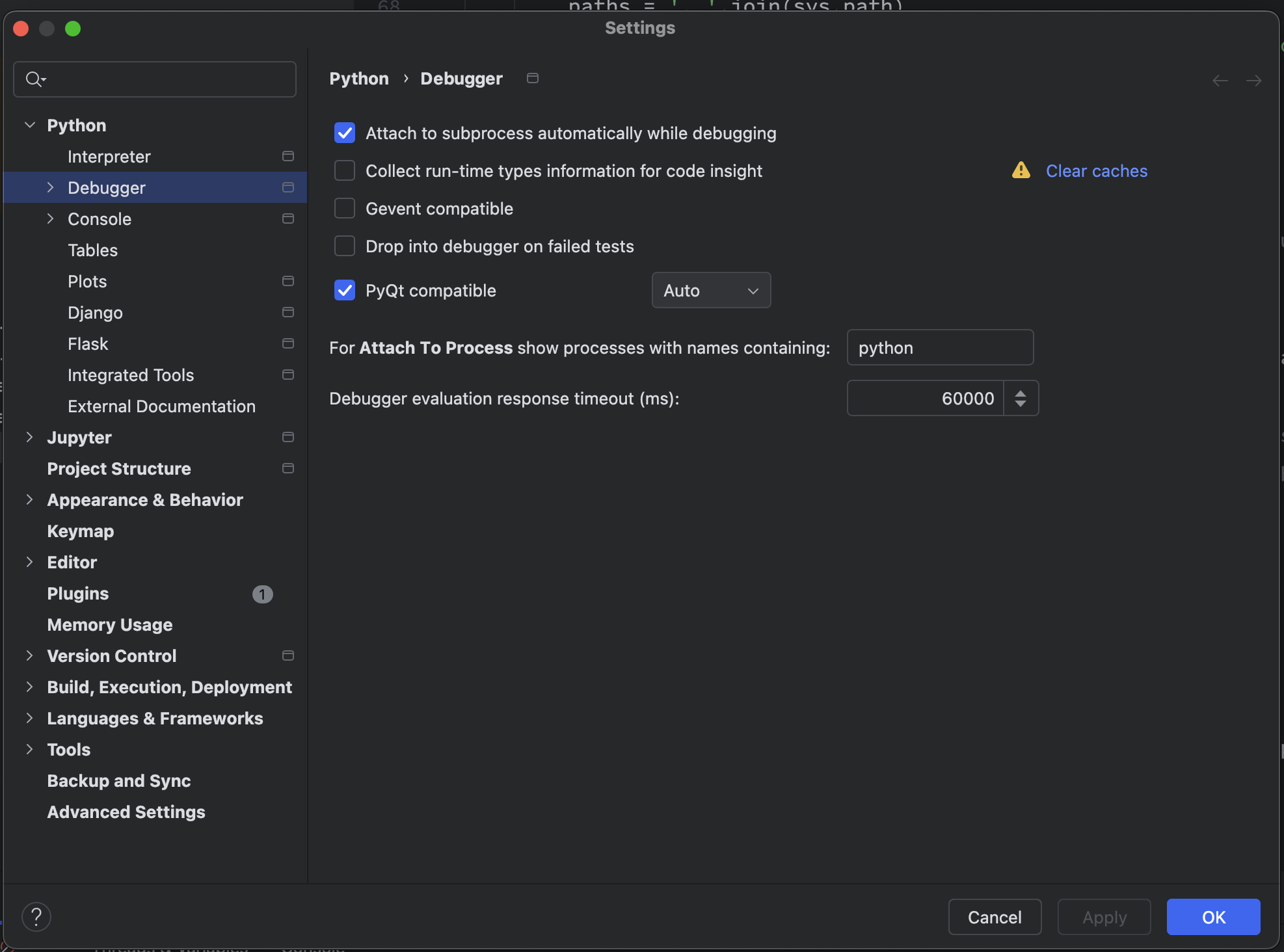
调整PyCharm里的PyQt compatible设置
为什么会这样?
或许你会好奇为什么会出现这种情况,且为什么直接运行的时候又不会报错呢?其实这是pydevd对Qt框架注入测试代码的时候(参见文件_pydev_bundle/pydev_monkey_qt),如果上述设置所选的PyQt compatible为auto,那么它会根据自己的优先级寻找当前环境所安装的目标框架(pyside6,pyside2,pyside,pyqt6,pyqt5,pyqt4),而非真正的”auto”(智能识别程序所用的Qt框架)。如果pydevd发现PySide6已安装,此时只会注入PySide6,而不会注入PyQt6的。
而注入的过程本质是通过import语句导入相应的框架,然后再对其内部的对象进行猴子补丁。这就意味着,对于PyQt6程序,它会在PyQt6导入前,先导入了PySide6,相当于
# --> Inserted by pydevd
import PySide6
# ... monkey patching for PySide6
# <-- Inserted Finished

# Here is your code...
import PyQt6
# ... your code所以也就是为什么macOS里的PyCharm会抱怨Class QDarwinBluetoothPermissionHandler is implemented in both /Users/jeza/PyqtInspect/.venv-313/lib/python3.13/site-packages/PySide6/QtCore.abi3.so (0x1070333f8) and /Users/jeza/PyqtInspect/.venv-313/lib/python3.13/site-packages/PyQt6/QtCore.abi3.so (0x106ac6f08). One of the two will be used. Which one is undefined.了😅。